Video too large to send from iPhone
The limit usually belongs to the app you're sending through, not to your iPhone. So first check whether you can send the video another way without losing quality. Compress it only when that doesn't work.
Limits by service
Figures come from each provider's help pages, checked in October 2026. They can change, so see the sources below.
| Service | Limit | What happens |
|---|---|---|
| WhatsApp, sent as a video | 100 MB by default, 64 MB on slower connections | Video is sent at reduced resolution (720p or 480p) |
| WhatsApp, sent as a document | 2 GB | The file is sent as it is |
| Gmail, personal account | 25 MB | Larger files become a Google Drive link |
| Apple Mail with Mail Drop | 5 GB | The recipient gets a download link for 30 days |
Send it without shrinking
- WhatsApp: choose the document option in the attachment menu instead of sending it from the gallery. The recipient gets the original file.
- Mail: attach the video in the Mail app and accept Mail Drop when it's offered. Attachments don't count against your iCloud storage.
- Someone nearby: use AirDrop, which sends the file directly between devices.
Compress it with SnapSlim
SnapSlim is my app, so weigh this section accordingly. It's useful here because it shows an estimated size before you start, so you can pick an option under the limit. The video is compressed on the device and isn't uploaded.
- Open SnapSlim, tap Video Compress and choose the video.
- Compare the estimated sizes of Low, Medium and High, and pick one under your limit.
- Tap Compress.
- Tap Share and choose the app you want to send it with.
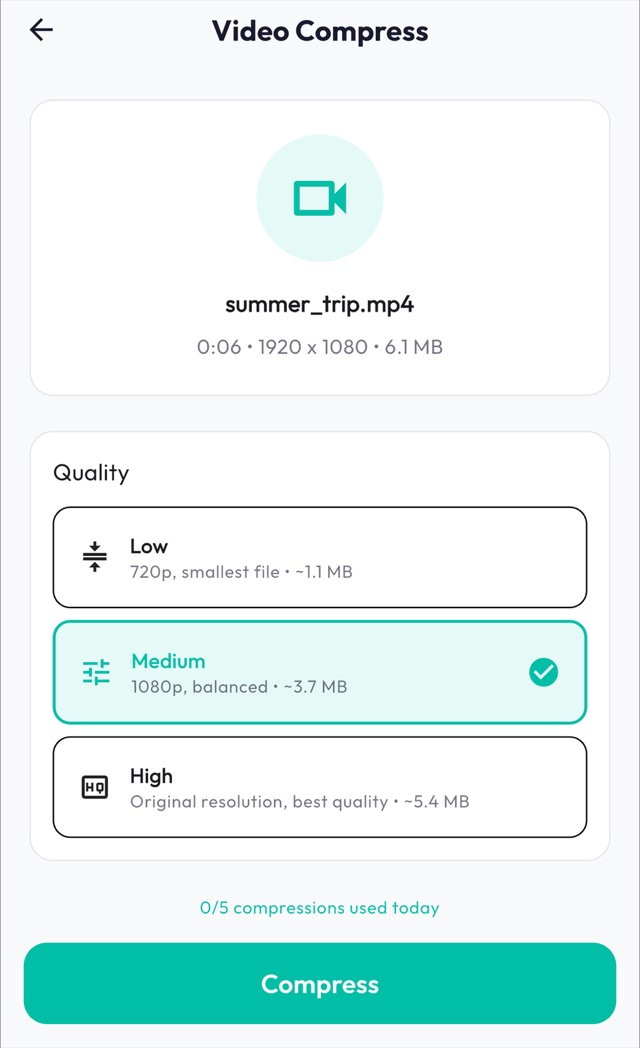
- The free plan includes 5 operations a day and shows ads.
If it's still too large
For long videos, sending a link usually works better than compressing further. Upload to iCloud Drive or Google Drive and share the link, but keep in mind that this does put the file on that service.
- Trim it: in the Photos app, open the video, tap Edit and drag the ends of the timeline. Then compress the shorter copy.
- Choose Low (720p), which gives the smallest file.
- Remove the audio if you don't need it. In SnapSlim this is a Premium feature.
Compress on your iPhone
SnapSlim is free to download and includes 5 operations a day, with ads. Your files are compressed on the device and never uploaded.
Download on the App StoreRelated guide: How to compress a video on iPhone